Continuous Improvement
Improvements through data collection & analysis
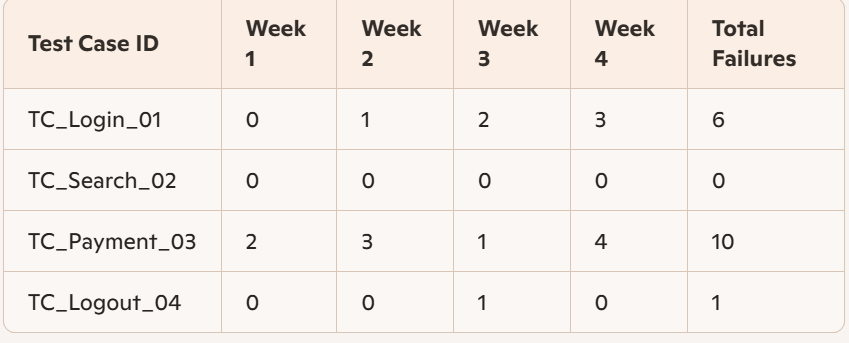
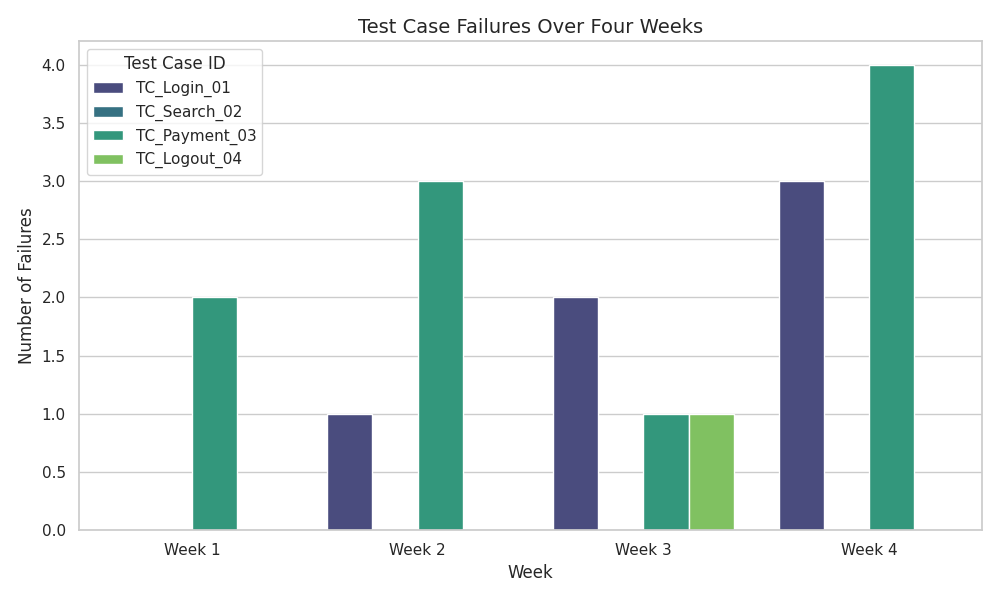
Test histogram – for test case trends (allows you to find and improve fragile tests). E.g. TC_Payment_03 shows frequent failures across multiple runs:
Artificial intelligence – self-healing algorithms can fix test cases and help with changed UI locators, which speeds up code maintenance.
Schema validation – API data analysis (e.g. properties derived from target endpoints) and DB analysis (e.g. allowed data types and value ranges). When you have schema validation, you don’t need to write automated tests to check these things. Cucumber has a –dry-run option that runs Cucumber without executing the steps, which checks which step definitions are matched by the feature files.
improvements to the test automation solution
Scripting
- Move duplicate code into functions for re-use. Cucumber step definitions can be changed to use regex, instead of strings, for more flexibility. The following example shows how a single regex-based step definition can be used in two different instances (“logs in” and “signs in”):
Given(/^the user (logs|signs) in with valid credentials$/) do
  # pending
end- Establish a failure recovery process for both the Test Automation Solution and the System Under Test (to be able to continue with the next possible test).
- Evaluate wait mechanisms. E.g. turn Cucumber sleeps into waits, or even better: subscribe to the event mechanism of the system under test.
Test execution
- Parallel execution can save time. E.g. Cucumber’s parallel_tests gem.
- Schedule batch jobs to run at a given time (CI/CD).
- Find and remove duplicate tests.
Verification
- Adopt a standard set of verification methods for use by all automated tests.
- This avoids re-implementing verification actions across multiple tests.
- Parameters can be used for methods that are similar, instead of near-duplicate code.
Test Automation Architecture
- It might be necessary to change the architecture to support improvements of the system under test, e.g. if APIs are introduced.
- It can be expensive to change the architecture at a late stage of the SDLC.
Test Automation Framework
- New versions of core libraries could break current tests, so do a pilot and impact analysis first.
- All teams could adopt the new version at once by updating the dependency in the core libraries layer.
- Otherwise, each team could update it individually in their business logic layer.
Setup & teardown
- Actions that are repeated before and after each test script/suite should be moved here. E.g. Cucumber before and after hooks.
Documentation
- Test automation documentation. E.g. how to run the Cucumber commands.
- User documentation for the Test Automation Solution.
- Test reports and test logs.
Test Automation Solution features
- New features can be added, such as detailed reporting and integration to other systems. E.g. Cucumber can be integrated with MS Teams to post test results to a chat or channel.
- Only add new features that will actually be used, to reduce complexity.
Test Automation Framework updates and upgrades
- New functions in the latest version may be available, that can be used to improve/fix existing test cases. E.g. the ‘Rule’ keyword was introduced in Cucumber in 2020.
- Run sample tests before rolling out the new version, because there is a risk it will negatively impact the existing tests.
- The sample tests should be representative of different test types, environments etc.
alignment with system under test updates
- Evaluate what changed in the System Under Test and make incremental changes to the testware / customised function libraries / OS, finally doing a full regression run to check that it didn’t affect the automated test scripts.
- Find ways to perform tasks more efficiently, e.g. optimise code / use newer libraries.
- Consolidate functions into fewer ones to minimise maintenance E.g. Cucumber can click on a button in several ways, such as click_button(‘elementID’) or click_on(‘elementID’), so choose a standard.
- Refactor the Test Automation Architecture to accommodate changes in the System Under Test.
- Naming conventions should be consistent with previously-defined standards. E.g. IDs could be standardised to ‘login-button’ or ‘loginButton’.
- Break time-consuming tests up into smaller ones and eliminate tests that never run, e.g. for system functionality that has been removed.
Using automation for non-test activities
Environment setup and control
- You could set up your test data (e.g. user profiles) with a script.
- Test logs and other testware can also be removed automatically from the test environment.
Data aging
- You could use automation to manipulate test data instead of doing this manually, e.g. update all dates in your test data from 2025 to 2026.
Screenshot and video generation
- You could use automation to crawl through all pages and create screenshots to be used in your documentation or for marketing purposes.