Verify the Test Automation Solution
Verify the automation environment & test tool setup
Test tool installation, setup, configuration and customisation
- Automated installation scripts / manually place files in folders.
- Automated installation from a repository: can guarantee that the same version is used and upgrades can be made through the repository.
Repeatability in setup/teardown of the test environment
- Check that there is no difference in operation within and across multiple test environments.
- Document the components so that you know what aspects of the Test Automation Solution will be affected when the test environment changes.
Connectivity with internal and external systems/interfaces
- Verify that the automation tool can access the internal/external systems and that permissions have been properly set for logging and reporting.
- Establishing preconditions for test automation is essential in ensuring it has been installed and configured correctly.
Test Automation Framework component testing
- Components need to be individually tested and verified.
- Functional tests: e.g. test that a wide range of GUI elements can be accessed, or that test reports produce accurate information.
- Non-functional tests: e.g. performance efficiency, resource utilisation, or interoperability with components within/outside of the Test Automation Framework.
Verify correct behaviour of a test script / suite
Check the composition of the test suite
- Check for completeness (all test cases have expected results and test data is present).
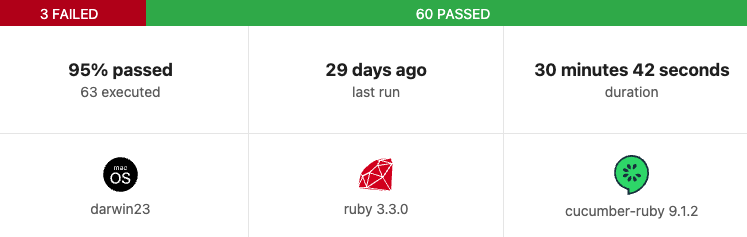
- Check for the correct version of the test automation framework and the system under test. Cucumber’s HTML reports give this information:
Verify new tests that focus on new features of the Test Automation Framework
- The first time a new feature is used it should be verified and monitored to ensure it is working correctly E.g. when a new Cucumber gem is installed.
Consider the repeatability of tests
- When repeating tests, test results should always be the same.
- Test cases that don’t give reliable results should be removed from the active suite.
Consider the intrusiveness of automation test tools
- Having the Test Automation Solution closely integrated with the System Under Test could result in the system’s functionality differing from when tests are conducted manually.
- Aim for high cohesion and loose coupling.
- Low level of intrusion: E.g. using existing UI elements.
- Moderately high level of intrusion: E.g. using dedicated software interfaces (such as modifying DOM elements rather than accessing the UI elements on the website).
- High level of intrusion: E.g. using hardware elements of the system under test (keyboards, touchscreens, communication interfaces). A high level of intrusion can show failures not evident in production, causing tests to fail and a loss of confidence in automation.
- Example of an intrusive test that overwrites existing data:
Feature: User login

Scenario: Successful login
  Given a user exists with username "admin" and password "password123"
  When the user logs in with "admin" and "password123"
  Then the user should be redirected to the dashboard

Given('a user exists with username {string} and password {string}') do |username, password|
  User.create(username: username, password: password)
end
This code is intrusive because it overwrites existing data, and another test could rely on a different version of the “admin” user.
Identify where unexpected results are produced
- When a test fails / passes unexpectedly, root cause analysis must be performed.
- Inspect test logs, data, setup/teardown of the script.
- Execute a few isolated tests – the fault could be in the test case / system / test framework / network / hardware.
- Verify if all assertions are in place, so you don’t get inconclusive results. Cucumber allows you to customise assertions, with your own error messaging, e.g.
Then('the user should be redirected to the dashboard') do
  expect(current_path).to eq('/dashboard'), "Expected to be on '/dashboard', but was on '#{current_path}'"
end
Static analysis as an aid to automation code quality
- Automated scans can inspect code to mitigate risks (e.g. via pipelines to provide immediate feedback) and sometime suggest code fixes.
- Tools can pick up security violations in your test code (e.g. plaintext passwords).